
Virtual Funeral Arrangement Process: A Family Guide
The virtual funeral arrangement process is the organized approach to planning and hosting a respectful, personal online memorial service that connects family and friends regardless of location. When distance, health, or circumstances prevent people from gathering in person, a well-planned virtual service gives everyone a meaningful way to say goodbye. Bravo Family Mortuary guides San Diego families through this process every day, and the steps are more manageable than most people expect. This guide walks you through what to prepare, how to structure the service, and how to handle the moments when technology does not cooperate.
What is the virtual funeral arrangement process?
The virtual funeral arrangement process is the step-by-step method of organizing an online funeral, memorial, or celebration of life service using video conferencing tools. The industry commonly calls this a “virtual memorial service” or “remote funeral service,” and both terms describe the same core practice. The goal is to create a ceremony that feels personal and dignified, even when attendees are spread across different cities, states, or countries.
Families in California also need to understand one legal requirement before any service takes place. In California, the Permit for Disposition is required before burial or cremation can proceed. This permit is the legal document that crematories and cemeteries must receive before accepting remains, so securing it is the first practical step in any arrangement, virtual or otherwise.
Once the legal side is handled, the virtual planning process focuses on three areas: gathering the right tools, structuring the ceremony, and preparing for technical challenges. Each area requires its own attention, and separating them early keeps the process from feeling overwhelming.
What you need before starting a virtual funeral arrangement
Good preparation is the difference between a service that feels connected and one that feels chaotic. Before you open a video platform, gather the following:
People and roles:
- A primary host who manages the program flow and emotional tone
- A technical co-host who handles admissions, muting, and screen sharing
- A designated speaker or officiant
- A family member to collect and organize photos, videos, and music
Tools and accounts:
- A computer or smartphone with a working camera and microphone
- A reliable internet connection (wired is more stable than Wi-Fi)
- An account on a video platform such as Zoom, Google Meet, or Microsoft Teams
- A shared folder (Google Drive or Dropbox) for tribute media files
Information to gather in advance:
- Full legal name, date of birth, and date of passing
- Disposition permit and death certificate copies (for California families)
- Contact list for all attendees, including email addresses
- Any written tributes, poems, or readings speakers plan to share
| Item | Why it matters |
|---|---|
| Technical co-host | Manages platform controls so the host stays emotionally present |
| Shared media folder | Prevents last-minute file-sharing delays during the service |
| Attendee email list | Allows you to send login details and preparation notes in advance |
| Disposition permit | Required by California law before cremation or burial can proceed |
| Rehearsal time | Catches audio and video problems before the service begins |
Pro Tip: Assign the technical co-host role to someone who is comfortable with technology but not expected to speak or grieve publicly during the service. Separating emotional and technical duties protects both the ceremony and the people in it.
How do you plan and host a virtual funeral step by step?
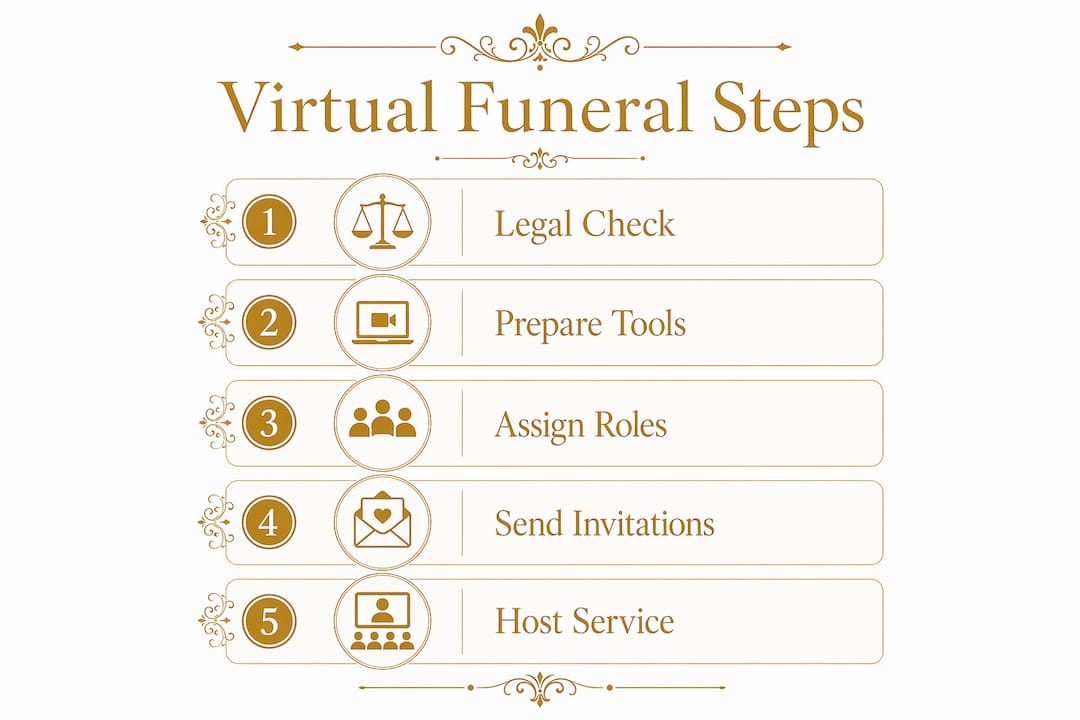
A balanced virtual service typically lasts 45–90 minutes. That range gives enough time for meaningful tribute without exhausting grieving attendees. Structure the program around five segments, and the service will feel complete without running long.
-
Welcome (5–10 minutes). The host opens the service, introduces themselves, and explains the format. Acknowledge that people are joining from different places and that this shared moment matters.
-
Photo or video tribute (10–15 minutes). Play a slideshow or short tribute video set to music the deceased loved. This segment requires screen sharing, so test it during rehearsal.
-
Shared memories (15–20 minutes). Invite two or three speakers to share stories. Keep each speaker to three to five minutes. The co-host can use the “spotlight” feature to highlight the active speaker.
-
Ritual moment (5–10 minutes). This can be a prayer, a reading, a moment of silence, or a synchronized candle lighting. Ritual gives the service a sense of ceremony that video calls often lack.
-
Informal time (10–15 minutes). Open the floor for attendees to share brief memories or simply be present together. This is the most emotionally unpredictable segment, so the host should be ready to gently guide the conversation.
Scheduling details should reach guests at least 48 hours in advance. Send the video link, passcode, and a brief note explaining what to expect. Families who send preparation emails report that attendees feel more settled and less anxious when the service begins.
The table below compares three common approaches to virtual funeral services:
| Format | Best for | Key consideration |
|---|---|---|
| Fully live | Families who want real-time connection | Requires strong internet and active co-host |
| Hybrid (live and in-person) | When some family can gather locally | Needs two camera setups and careful audio management |
| Recorded and shared | Attendees in distant time zones | Loses real-time participation but ensures access for all |
Pro Tip: Use specific, concrete memories during the tribute segments. “She always kept butterscotch candies in her coat pocket” lands harder than “she was a generous person.” Specific details create the feeling of presence that virtual settings can otherwise lack.
How do you handle technical challenges during a virtual funeral?
Technical difficulties are magnified on video in ways they are not in person. A five-second audio dropout at a graveside service goes unnoticed. The same dropout during a virtual eulogy breaks the emotional thread for every attendee. Preparation is the only reliable solution.
A 20-minute rehearsal before the service can prevent the majority of problems that arise. Test the microphone, camera, screen sharing, and any tribute videos during this rehearsal. Ask the co-host to join from a separate device to simulate the real attendee experience.
The most common technical issues and how to address them:
- Audio feedback or echo. Ask all attendees to mute themselves on entry. Use platform settings to enable “mute on join” automatically.
- Uninvited attendees. Enable the Waiting Room feature so the co-host approves each person before they enter.
- Screen sharing problems. Assign screen sharing permission only to the host and co-host. Test the tribute video with sound before the service.
- Attendee camera or audio failure. Prepare a brief written guide and send it with the invitation email. Most issues resolve with a device restart.
- Internet dropout by the host. Designate a backup host in advance. If the primary host loses connection, the backup takes over immediately.
Zoom privacy settings such as Waiting Room, passcodes, and host-only screen sharing prevent disruptions and protect the tone of the service. These settings take less than five minutes to configure and make a significant difference in how the service feels.
Pro Tip: Have the co-host keep a private chat window open with the host throughout the service. This lets them communicate about technical issues without interrupting the ceremony.
How do you make a virtual service accessible and meaningful for everyone?
Virtual memorials can include interactive elements such as synchronized candle lighting, shared slideshows, group tribute videos, and virtual guest books. These shared activities create a sense of togetherness across distances that a passive viewing experience cannot replicate.
Accessibility means more than technology. Consider the following when planning:
- Time zones. If family is spread across the country or internationally, choose a time that works for the most important attendees. Record the service for those who cannot join live.
- Tech comfort levels. Send a simple one-page guide with login instructions. Offer a 10-minute “tech check” call the day before for attendees who are less comfortable with video platforms.
- Language needs. If your family includes Spanish-speaking members, prepare bilingual invitation materials and consider a bilingual host or co-host.
- Emotional preparation. Let attendees know the format in advance. People grieve more openly when they know what is coming and feel safe in the space.
- Privacy. Use a passcode and Waiting Room to keep the service intimate. Not every virtual service needs to be open to the public.
Portable funeral plans also protect families by ensuring that arrangements can be accessed without a specific account login later. This matters most for families who are pre-planning, since the original provider may not always be involved when the time comes. Bravo Family Mortuary’s online pre-planning tools are designed with this portability in mind.
Key Takeaways
The virtual funeral arrangement process works best when legal preparation, clear role assignments, and a structured program come together before the service begins.
| Point | Details |
|---|---|
| Legal step first | Obtain California’s Permit for Disposition before cremation or burial can proceed. |
| Separate roles | Assign a technical co-host so the host can focus fully on emotional presence. |
| Structure the program | A 45–90 minute service with five named segments keeps the ceremony focused and meaningful. |
| Rehearse before the service | A 20-minute tech rehearsal prevents the majority of problems that arise during live services. |
| Plan for accessibility | Record the service, send preparation guides, and use platform privacy settings for all attendees. |
What I have learned from guiding families through virtual services
The families I have worked with who felt most at peace after a virtual service shared one thing in common. They let grief lead the ceremony design, not convenience. They did not choose a virtual format because it was easier. They chose it because it was the only way to bring everyone together, and they honored that choice by preparing with the same care they would give an in-person service.
The biggest mistake I see is treating the technical setup as an afterthought. Virtual and hybrid memorials require a tighter plan than in-person gatherings because silences and disruptions are amplified on screen. When families skip the rehearsal or forget to assign a co-host, the service suffers in ways that are hard to recover from mid-ceremony.
What I tell every family: the technology is just the room. You still fill it with love, specific memories, and the people who mattered most to the person you lost. San Diego families have shown me that a virtual service, done with intention, can be just as healing as any gathering in person. You do not need a perfect connection. You need a clear plan and the willingness to be present with each other, wherever you are.
— Steve Olsher
Bravo Family Mortuary is here to help you plan
Bravo Family Mortuary is a family-owned, 5-star rated funeral home serving all of San Diego County, 24 hours a day, 7 days a week. Families can complete funeral and cremation arrangements entirely online through the secure PartingPros portal, at any hour, without an in-person visit or sales pressure. Pricing is transparent and all-inclusive, with no hidden fees.
Bravo Family Mortuary offers direct cremation, aquamation, traditional burial, green burial, celebration of life services, and military and veteran funeral services. Bilingual support is available for Spanish-speaking families across San Diego County. Whether you are arranging a service now or planning ahead for the future, the team is ready to help at whatever pace feels right for your family. We are here whenever you are ready.
FAQ
What is a virtual funeral arrangement process?
The virtual funeral arrangement process is the organized method of planning and hosting an online memorial or funeral service using video conferencing tools. It covers legal preparation, program structure, technical setup, and attendee communication.
How long should a virtual funeral service last?
A balanced virtual service typically lasts 45–90 minutes, covering a welcome, tribute, shared memories, a ritual moment, and informal time. Services shorter than 45 minutes often feel rushed, while services longer than 90 minutes can exhaust grieving attendees.
What platform is best for hosting a virtual funeral?
Zoom is widely used for virtual funerals because its Waiting Room, passcode, and host-only screen sharing settings protect the privacy and tone of the service. Google Meet and Microsoft Teams are also reliable options for families already familiar with those platforms.
Do I need a co-host for a virtual funeral?
A separate technical co-host is strongly recommended. The co-host manages admissions, muting, and screen sharing so the primary host can focus entirely on the emotional flow of the ceremony.
Are there legal requirements in California before a virtual funeral can take place?
Yes. California requires a Permit for Disposition after the death certificate is filed before cremation or burial can proceed. This legal step applies regardless of whether the memorial service is held in person or virtually.